WE'VE MOVED!! You can now find us at Sunshine and Spoons!

Showing posts with label tutorial. Show all posts

Wednesday, November 27, 2013

How To Make Your Own Board Book

When my older sister and I were kids, my mom helped us make a special board book for our younger sister's birthday one year.  We cut out pictures in magazines, glued them to cardboard, and decorated the blank space around the pictures.  Our mom assembled our decorated pages into a board book that was much loved by my little sister for years.  I actually have the book now and my kids love looking through it too.


For Little Man's third birthday, I threw a "Brown Bear, Brown Bear" Eric Carle themed party since he absolutely loves the book.  Since he's also obsessed with tractors, I decided to create a special book for him that included his love for the book, Brown Bear, Brown Bear, What Do You See with farming. 

First, I gathered my supplies.

Cardboard: I used cardboard-not the heavy corrugated kind, but a cardboard that was just a little heavier than that used in a cereal box.  You can use a cereal box too, just glue together 2 layer of cardboard for each page instead of decorating both sides.  That will make it thicker and more heavy duty.

Ziploc Bags: I bought the cheap brand of sandwich sized ziploc bags.  Regular ziploc bags have writing on them and you'll need plain ones so nothing covers up the pictures.

Plain baggies

Yarn: The yarn is used to hold the pages together.  Pick whatever color you want :)  You'll only need about a yard of it.

Paper, pencils, scissors, hole punch:  To give the book more of a clean look, I covered the cardboard with paper and because I'm lazy resourceful, I printed my pictures on large shipping labels so I could just peel and stick.  I used colored pencils to color my pictures because I was almost out of color ink for my printer and it was important that the colors were bright.

I spent several hours coloring all the pictures for the book.  It would have been much faster to buy a new color ink cartridge for my printer.

First, I cut my cardboard down to fit inside of the ziploc bags.  Make sure you test the cardboard to make sure it fits before decorating the cardboard so you don't have to cut any of the design off later.  Leave about 3/4" on the side of the cardboard nearest the opening of the bag so you can punch holes in the ziploc bag later.


I found my pictures using a google image search.  I copied and pasted them into a word document so I could manipulate the sizes to where I needed them, and then printed them in both half page sizes (to fit inside the ziploc bags) and in miniature sizes for the last page of the book. 

The miniature pictures for the last page in the book.

You can decorate your cardboard pages or the paper you'll be using to cover the cardboard however you'd like.  This make a perfect project for older siblings to do for younger ones, just like I made for my younger sister.

I hand-wrote the words for each page, but you could just as easily do that before printing it.  I traced my cardboard onto the paper so I would be sure to get it the right size when I cut it out.   


Glue the paper to the cardboard pages.  If you're using cereal boxes for the cardboard, glue two pieces together to make it thicker.  Slide the cardboard pages into the ziploc bags and seal them, making sure to get all the air out.  Stack the ziploc bags in the order you want them and flip through them to be sure all the pages are right.

One bag at a time, punch two holes in each ziploc bag, about 1 1/2" from the top and bottom.  Stack the bags up again in the right order and thread the yarn through the top hole and then the bottom hole.  Continue to go through the two holes four or five more times so the pages are tied securely together.  Tie a knot in the yarn, being sure to keep it tight.  To make it more decorative, you can also tie a small bow and double knot it so it doesn't come loose.

Finished!

Open to the first page

Little Man loves reading his book by himself.

Star loves the book too and can easily flip the pages by hersel.
 
If you're interested in making a farm/Eric Carle themed book like mine, here are the pages in order:

Green tractor, green tractor, what do you see?
     I see a brown horse looking at me.

Brown horse, brown horse, what do you see?
     I see a red barn looking at me.

Red barn, red barn, what do you see?
     I see a white sheep looking at me.

White sheep, white sheep, what do you see?
     I see yellow corn looking at me.

Yellow corn, yellow corn, what do you see?
     I see a black cow looking at me.

Black cow, black cow, what do you see?
     I see a blue truck looking at me.

Blue truck, blue truck, what do you see?
     I see a pink pig looking at me.

Pink pig, pink pig, what do you see?
     I see a gray silo looking at me.

Gray silo, gray silo, what do you see?
     I see a farmer looking at me.
      
Farmer, farmer, what do you see?
     I see a green tractor, a brown horse, a red barn, a white sheep, yellow corn, a black cow, a blue truck, a pink pig, and a gray silo looking at me.  That's what I see.


Saturday, August 31, 2013

Emilie Ruffle Onesie - FREE Pattern!

Ruffle butt onesies are one of my top sellers in my clothing shop.  They're super cute and quick to make!  The hardest part is lining up the ruffles on the backside of the onesie, but with a little practice that gets easier.


So how would you like a pattern for ruffle butt onesies...for FREE?


The pattern includes 9 pages of detailed, step-by-step instructions and measurements for adding ruffles and an applique to a purchased onesie. Sizes Newborn through 18-24 Months are included.

Just click on this link to download your free pattern.


I'd love to see pictures of your creations!  You can share them on the Little Owl Patterns Facebook page.


Happy sewing!

Check out more patterns from Little Owl Patterns here.


Friday, August 23, 2013

Commenting Tips for Bloggers and Blog Readers

I love getting comments on my blog.  It lets me know that someone out there is actually reading what I have to say, and I love getting to know my awesome readers.  I try to reply to every comment although I do miss some here or there.  Because most people aren't going to remember to come back to the blog post and check for a reply, I also email them my response by hitting reply on the email that blogger sends me with the comment.  Unfortunately, some people won't ever receive my email because they don't have an email associated with their blogger account.  When I get a comment from those people, the email from blogger replies back to "noreply-comment@blogger.com."  :(

Here are some tips on blog commenting for both bloggers and blog readers.  Basically, if you're reading this, than it's for you, whether you write a blog or not :)  


Tips for blog readers: 
If you read something you like (here or on any other blog) let the author know!  Comment, like the post on Facebook, etc.  It really means a lot to bloggers.  And I think it goes without saying that if you read something you don't like and feel a need to comment on it, just make sure you're respectful in your comment.  Bloggers are people with feelings too!  And FYI, I have awesome readers because none of the comments I've ever received have ever been anything but positive.  :) 

Check to see if you're a no-reply blogger and if you are, please fix it so I (and other bloggers) can respond to your comments!!  Here's a great tutorial from Story of My Life on how to do that.


Tips for bloggers:
Reply to comments!!!  There are some blogs I love reading and commenting on, but after dozens of comments and not a hint of a reply, I'll give up and stop commenting and sometimes even stop reading the blog because it feels like the blogger really doesn't care about his or her readers.  Let your readers know that they matter.  If you're not sure how to receive email notifications of comments, go to "settings" on your blog dashboard, then go to "Mobile and Email" and then fill out the "Comment Notification Email" box. 

Comment on other blogs frequently.  Not only is that simply a nice thing to do, but it also is a great way to build your blog readership and meet other bloggers.  Make sure that you're not a no-reply blogger!

I have two words for you...word verification (also know as captcha).  People are a lot less likely to comment on your blog if you require them to squint at a little box with nearly indecipherable letters and/or numbers and then translate that into another box.  To disable this feature on your blog, go to "Settings," then "Posts and Comments."  Where is says "Show word verification, click NO.


Make sure you read the comments for more tips and advice!

Do you have any tips to add?  


Sunday, April 21, 2013

How To Make Your Blog Post "Pinnable"

Pinterest, blogging, business, tutorial


If you're like me, you have a "pin it" button installed on your toolbar and you aren't afraid to use it...liberally (at last check, I had over 4000 pins on my 48 Pinterest boards).  However, not everyone has that button installed or maybe they just need a little nudge to pin something from your blog.

Here's how to make your blog post "pinnable."

First write your blog post, complete with pictures (you can't pin words!), and publish it.  Now before you start promoting it on your Facebook page or Twitter (you do have those, right? Because they're awesome and free ways to promote your blog!) open your blog post like you're going to read it, and then open the Button and Widget Builder page on Pinterest in another tab.  Select the "Pin It Button."  Under Button Type, select "One Image."
Copy and paste the URL of your blog post into the first space.  
Click on the picture in your post that you want readers to pin so it opens up in the window by itself.  Copy and paste the URL of the image into the second space where it says "image."  Finally, add a description of your pin (Examples: Awesome giveaway at Awesome Giveaways Blog, How to host an awesome giveaway on your blog,)  Click on the red button that says "Build It!" and scroll down to copy your html code.
  
Next, open your blog post back up to edit it.  You do not need to be in HTML format to add the code.  Paste the html code right below the image you just built a pin for or wherever you want the button to go in your post.  Publish your post and you're done!

I decided to put the html code right below my picture so the Pin It Button shows up directly below it.

Now, if you want to create a hover button (for an example, hover over any of the pictures in this post!) on the images themselves, go back to the Buttons and Widgets Builder page on Pinterest.  Select the "Pin It Button" and then select the option that says "Image Hover" for the button type and click "Build It."  Copy and paste the html code onto the very bottom of your blog post.  Once again, you do not need to be in HTML format to add the code.  You probably want the description on the pins to be filled in for people which is helpful because sometimes people just hit the period and call it good enough which makes it harder for your pin to be repinned and found on Pinterest.  Click on the image in your post while you're editing and click on "Properties."


Under "Title Text," fill in the description just like you would for a pin.  Hit publish and admire your work!  

Thanks so much for visiting Supermommy!...Or Not.  I'd love for you to like me on facebook" and follow me on Twitter!  


Wednesday, March 6, 2013

How to Applique

Applique sounds kind of scary, but it's actually really easy! If you haven't appliqued before or are a beginning seamstress, it's best to start with shapes that have straight lines such as a star or block.  A little practice and you'll be moving onto more complicated shapes in no time at all.  I found it to be helpful to practice sewing curves on scrap material.

Gather your supplies: A scrap of fabric, scissors, Wonder Under Lite (or another type of lite heat n' bond), iron, and ironing board

Start by decided what shape (or letter, number, etc) you want to applique.  Freehand or trace the shape onto a piece of cardstock and cut it out.   

Cut out a piece of fabric big enough for the applique (perfect way to use up scraps!) and iron it flat.  Cut out a piece of Wonder Under that's the same size as the fabric.  Using the directions on the package, iron the Wonder Under onto the backside of the fabric.  Trace the applique shape onto the paper backing of the Wonder Under and cut it out.  If the shape is directional (i.e. a number or letter), make sure to trace it mirror image!  I've had to redo many appliques because I forgot to flip the cardstock over before tracing.


Peel the paper backing off of the shape and, using the package directions, iron it onto whatever you are appliquing.  Make sure that it's placed exactly where you want it before ironing it in place.

I usually use a zig zag stitch, but if you don't mind a little fraying around the edges, you can also use a straight stitch to secure the applique.   Sew all the way around the applique, stopping to lift the foot and turn the fabric as needed.  Sew a couple of straight stitches at the beginning and end to secure the stitching.  
 

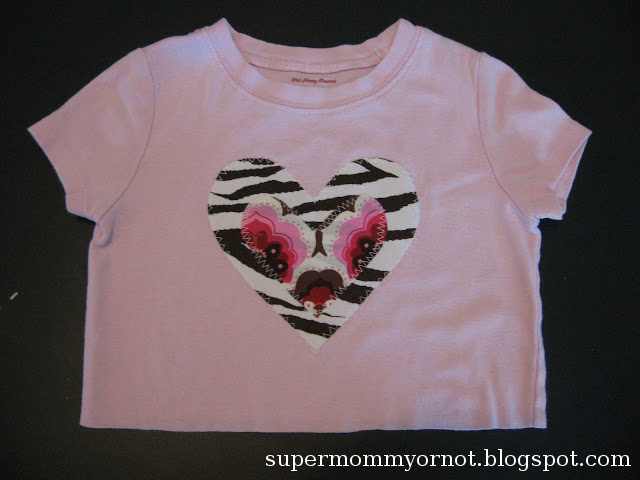
Finished!


Thanks so much for visiting Supermommy!...Or Not.  Please take a moment to "like" me on facebook" and follow me on Twitter! 

Monday, August 13, 2012

How To Ship Using Paypal

I used to handwrite all the addresses on my packages, lug them to the post office, stand in line, and mail them there.


Until I discovered Paypal shipping.  I wish I'd known about it two years earlier when I started selling online as it would've saved me a ton of time and money.

The only things you need to ship through Paypal are a printer and scale.  If the high cost of printer ink scares you, like it did me, read this for how to save money on ink cartridges.  I got my scale on Ebay for a good price, but you could also get a kitchen scale at Walmart if you wanted to. 

It's also helpful to have stick-on shipping labels (so much easier than taping the labels on!) and poly or bubble mailers.  You can purchase both of those on Ebay or Amazon at good prices.  I've also seen shipping labels and bubble mailers at Walmart, but they are more expensive.

The first thing you'll need to do is log into your Paypal account.  Find the transaction for whatever it is you're shipping.  If the payment wasn't made through Paypal, you can still print a label by going here.  You'll just need the customer's name and address for that.  

Clicking on "Payments Received" will narrow down the search if you have a lot of transactions.  You can also do a search from that screen with several different options if you're having a hard time finding it.


Next click on "Print shipping label" next to the transaction.  After you're done creating the shipping label, you'll be able to track the order in the mail.


Your address and the customer's address will already be filled in so all you have to do is select the service type, package size, and fill in the weight of the package.  If you won't be making it to the post office on the same day you print the label, be sure to change mailing date.  When you have all the information filled in, click "Continue" at the bottom of the screen.  The next screen will confirm your purchase of the shipping label and print it for you. 


Before you print your label, you may want to change your printer settings so it doesn't print a receipt as well.  You'll receive an email receipt so a paper receipt is optional.  Just keep in mind that if you do decide to print a receipt, it will take up a whole sheet of paper or 2 shipping labels instead of just half a sheet of paper or 1 shipping label. 

You can change the receipt settings by clicking on "Edit printer settings" under the Printer section.  Uncheck the box that says "Print receipt"

And you're done!  You can either arrange for your mailman to pick up your packages or drop it off at the post office.  The best part of it is that the shipping is cheaper when you purchase it online and when you ship First Class Parcel or Priority mail, delivery confirmation is free, otherwise it's $0.19.  When I shipped at the Post Office, I paid $0.70 per package for delivery confirmation. 


Thanks so much for visiting Supermommy!...Or Not.  Please take a moment to "like" me on facebook"!


Monday, August 6, 2012

15 Minute Dress

Do you remember when broomstick skirts were so popular a few years back?  I have quite a few in my closet and I do still wear the basic ones, but there are a few that just don't fit my style anymore.

Such as this bright pink skirt:


Princess saw it hanging out in the back of my closet one day while "helping" me put laundry away and fell in love with it.  So naturally, I threw it in my upcycle pile and forgot about it until today.  


My first step was to measure Princess from just below her armpits to a few inches below the knees.  I roughly measured that length, plus a few inches for seam allowances, up from the bottom of the skirt and cut off the top.  I also measured around her chest.  Her measurement was 22", so I subtracted one inch to make sure the dress fit snugly around her chest and didn't fall down.  


Next, I made a casing for the elastic by folding the top edge over about 1/4" and then over again about 1".  I pinned and sewed the casing, leaving a 2" opening to put the elastic through. 


 Then, I threaded the elastic through the casing, using a safety pin.  I sewed the opening shut and adjusted the fabric so it fell evenly all the way around.

If I'd left it like this, Princess would've had a new skirt!
I pulled the drawstring out of the original waistband of the skirt and cut it in half to use for the straps of the dress.  Princess tried on the dress and I pinned the straps on where I wanted them to go.  Then I took it away from her which made her really mad, and trimmed the straps so they didn't hang down. 

This shows the straps pinned to the outside of the dress, but I did switch them around to the inside before sewing.

I folded the raw edges of the straps under and sewed a vertical line down each strap through the elastic.  This made the straps more durable plus will hold the elastic in place so it doesn't slide around and get twisted in the wash. 


Done!  Fastest dress ever, probably because I didn't have to hem it, and the materials were already in my closet!  If you don't have a broomstick or maxi skirt to upcycle, you can usually find them at thrift stores for a cheap price. 


Princess likes to wear it over her petticoat dress or a shirt.


Perfect for twirling!  The best thing about this dress is that Princess will be able to wear it for quite a few years.  When it gets too short for her to wear as a dress, I can snip the straps off and she'll have a new skirt!


This post is linked up with "The Dress Project: Summer Challenge" at Bits and Pieces From My Life.


Thanks so much for visiting Supermommy!...Or Not.  Please take a moment to "like" me on facebook"!

Monday, July 23, 2012

The Dress Project-Summer Challenge


One of my favorite bloggers, Kristin from Bits and Pieces From My Life, got this adorable dress as a hand-me-down from a cousin for her daughter and decided to alter it to fit each season.  It just so happens that Princess also received the same dress as a hand-me-down from a friend, so naturally I "stole" Kristin's idea for sprucing it up once the original flower on the front lost its flair.  The versatility of this dress makes it worth keeping in Princess's wardrobe.  She's worn it as a sundress, over a shirt, and now wears it as a tunic length shirt over leggings or pants or over her petticoat dress.   

The dress "Before"
 The first step was to cut the threads holding the hot pink flower onto the dress. 

The original flower.  It looked cute at first, but was pretty droopy by the time I took it off. 


 Next, I marked out a buttonhole right where the flower had been attached.  If your sewing machine has a buttonhole maker and you don't know how to use it, now is the perfect time to learn as the embellishments will cover any mistakes.     


Done!  The whole project took me less than 15 minutes from start to finish.  Now I can clip any of Princess's hair accessories right in the buttonhole and have a new look everytime she wears the dress.  

Hairbow from Dots and Lollipops


Hairbow from ~Hanna's Hair Bowtique~


This post is linked up with "The Dress Project: Summer Challenge" at Bits and Pieces From My Life


Thanks so much for visiting Supermommy!...Or Not.  Please take a moment to "like" me on facebook"!

Related Posts Plugin for WordPress, Blogger...